Guide For home
Holiday deals with AI: pick the right prompt and buy safely
Six free shopping prompts, one for each kind of holiday shopping. Pick yours, check the prices it finds, spot fake markdowns and fake stores, and run a quick check before you pay.
What this guide does
- You'll end up with
- you know which prompt to use, every price you act on is one you saw on the store's own page, and you've run the before-you-buy checklist.
- Time
- About 20 minutes (our rough guess, not a timed test)
- You'll need
-
- An AI chat app
- Your gift list, or who you're shopping for and your budget
- Your need-by date and ZIP code (optional)
Step 1 of 6
Pick your prompt
Use the chooser below. Each prompt fits one kind of shopping.
One prompt per job. Each one is on its own prompt page, with its own Try it.
Scroll to see every column
| If you... | Use this prompt | You type in |
|---|---|---|
| Already know what to buy | Price check my gift list | Your list, need-by date, ZIP code |
| Know the person, not the gift | Find a gift they'll actually use | Who it's for, what they like, budget per gift |
| Want deals on a kind of thing | Real deals in one category | Like "kitchen gadgets", who it's for, budget |
| Shop one store you like | Best deals at one store | The store, what you want, budget per item |
| Priced a list a few days ago | Recheck my prices | Your table from last time, need-by date |
| Sell something online | Will AI shoppers recommend my product? | Your product's name, price and description |
Step 2 of 6
Fill in the top block only
Change the lines above the line that says don't change anything below. Paste it all into your AI chat app.
Don't paste card numbers or your home address. A ZIP code is enough.
Try it: Price check my gift list
2 or 3 store prices for each item in one table, with links, what to order now and what can wait.
You don't need to read the whole prompt. Put your own details in the numbered lines at the top, then copy all of it.
Copy and paste
FILL THIS IN (then copy everything into your AI chat)
My list (the things you want to buy, in any format: commas, one per line, or rough names): AirPods Pro 3, Kindle Paperwhite 16 GB black (2024 model), Stanley Quencher H2.0 FlowState Tumbler 40 oz, Nintendo Switch 2 + Mario Kart World Bundle
Need it by (optional, the date it has to arrive): December 20, 2026
My ZIP code (optional, so it can check delivery dates): 10001
--- Don't change anything below this line ---
You are my deal checker. Your job is to find where each item in "My list" really costs the least at a store I can trust, and to tell me what to order now and what can wait. Don't buy anything. Use web search, then open each store's product page yourself and read the price there; a price seen only in a search result or snippet is "unverified".
The list can be in any format: commas, lines or rough names. If an item could mean more than one version, pick the most common current version, name it, and keep going instead of asking me. If "Need it by" or "My ZIP code" is blank, skip that part and don't ask me for it.
For each item:
1) Check many well-known stores (Amazon, Walmart, Target, Best Buy, the brand's own store, and others that sell this item). Open each product page yourself. Every store you consider needs a price and a link to that item's own product page (not a homepage, category or search page). If a store blocks you or only gives you a search page, skip it and keep checking others. If a page shows both the store's own price and a marketplace seller's price, use the store's own. For any store that isn't a big national name, say in a few words why it's trustworthy.
2) Make sure it's the same item at each store (model, size, color). If it isn't, say what's different.
3) Next to each price, write "checked" only if you opened that product page just now and saw the price. Otherwise write "unverified".
4) From every store you checked, pick only the top 2 or 3 deals for that item to show me. Rank them: best first. When prices tie (or are within about $1), pick the winner with one short reason, drawn from what you saw: longer return window, sold and shipped by the store itself, lower shipping cost or faster shipping, arrives before "Need it by", or a store that is easier to deal with. Never make an out-of-stock listing the top pick. If an out-of-stock listing would otherwise have ranked high, mention it in one short line under the table (store, price, "out of stock") and still put an in-stock deal first.
5) Good price? Say so only from what a page shows (a "was" price, a sale label, or a lower price at another store you listed). Otherwise say nothing about it.
Lay it out as ONE table, with no notes before it. Show each store once, only in the table. Nothing in the table is repeated anywhere else. No paragraphs.
The table has one row per item in "My list", in list order, and exactly these 4 columns: Item | Best deal | Why it wins | Also checked
- Item: the item name (the version you picked).
- Best deal: **[Store] $[price]**, checked|unverified, [link]. Then the checks you saw, in a few words each, using ✓ for yes and ✗ for no: ✓/✗ In stock; ✓/✗ Sold by [store]; ✓/✗ Ships free (or the cost; a posted free-over-$X minimum counts, and if this item alone is under that minimum write "✗ Ships free (over $X)"); and, if "Need it by" has a date, ✓/✗ Arrives by [date] only when the page shows a delivery date for "My ZIP code" if given. Leave out any check you could not see; do not write "unknown" or "not shown".
- Why it wins: a few words (cheapest, or the tie reason). Add here, in a few words, any good-price note from step 5, any difference in model, size or color, and why a store that isn't a big national name is trustworthy.
- Also checked: the next 1 or 2 stores from your top 2 or 3, each as [Store] $[price], checked|unverified, [link]. If there are none, write "none found".
Keep every cell short.
Under the table, only these short lines, one line each, in this order:
- Out of stock seen: store, item, price, link, for any strong out-of-stock listing. Skip this line if you saw none.
- Deadlines (only if "Need it by" has a date): each store's own posted holiday order-by date, linked to that page (not a homepage), for the stores in the table. List only stores where you found a posted date. If you found none, write "Deadlines: no posted holiday order-by dates found."
- Order now: an item goes here only if it's low or out of stock, or its delivery date is close to or past "Need it by"; give the reason in a few words. If nothing qualifies, write "Order now: nothing" and don't list items there anyway.
- Can wait: every other item, by name.
- Fewer than 2 stores: any item you couldn't price at 2 stores, with how many you found; don't claim more. Skip this line if there are none.
- 2 follow-up prompts I can paste next (for example: recheck these prices in a few days, or find a cheaper alternative to one item).
Don't buy anything, add to a cart, create accounts, sign me up, connect apps, ask for card or payment details, or set reminders or scheduled checks.
Example result
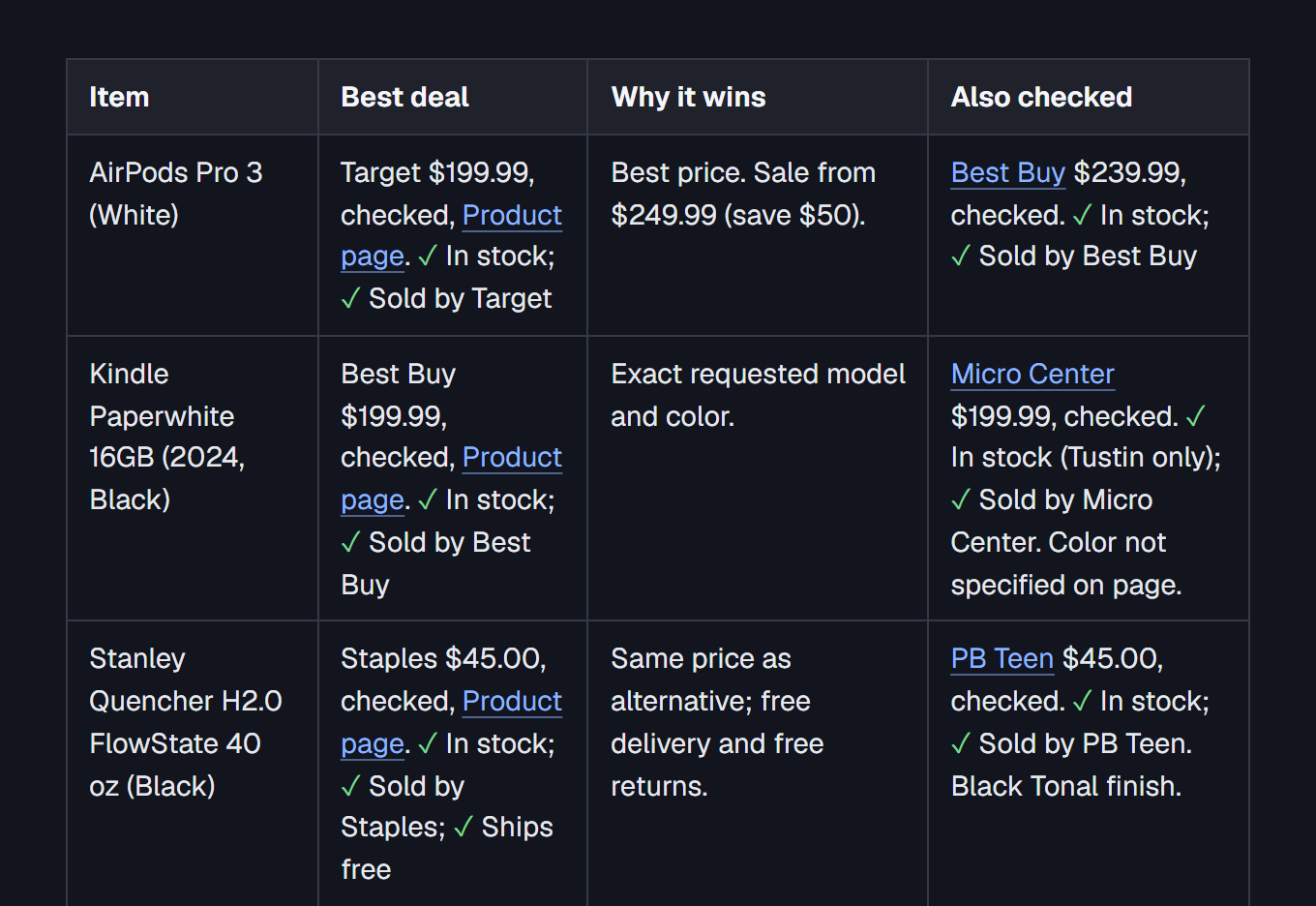
We filled in: My list: AirPods Pro 3, Kindle Paperwhite 16 GB black (2024 model), Stanley Quencher H2.0 FlowState Tumbler 40 oz, Nintendo Switch 2 + Mario Kart World Bundle. Need it by: December 20, 2026. My ZIP code: 10001.
AirPods Pro 3 (White)
- Best deal
- Target $199.99, checked, Product page.
- Yes: In stock
- Yes: Sold by Target
- Why it wins
- Best price. Sale from $249.99 (save $50).
- Also checked
- Best Buy $239.99, checked.
- Yes: In stock
- Yes: Sold by Best Buy
Kindle Paperwhite 16GB (2024, Black)
- Best deal
- Best Buy $199.99, checked, Product page.
- Yes: In stock
- Yes: Sold by Best Buy
- Why it wins
- Exact requested model and color.
- Also checked
- Micro Center?utm_source=chatgpt.com) $199.99, checked.
- Yes: In stock (Tustin only)
- Yes: Sold by Micro Center. Color not specified on page.
Stanley Quencher H2.0 FlowState 40 oz (Black)
- Best deal
- Staples $45.00, checked, Product page.
- Yes: In stock
- Yes: Sold by Staples
- Yes: Ships free
- Why it wins
- Same price as alternative; free delivery and free returns.
- Also checked
- PB Teen $45.00, checked.
- Yes: In stock
- Yes: Sold by PB Teen. Black Tonal finish.
Nintendo Switch 2 + Mario Kart World Bundle (2026)
- Best deal
- Target $549.99, checked, Product page.
- Yes: In stock
- Yes: Sold by Target
- Why it wins
- Official current bundle, including game download and 3-month Nintendo Switch Online membership.
- Also checked
- Nintendo $549.99, unverified. Official MSRP; product page did not display a purchase price.
Deadlines: no posted holiday order-by dates found.
Order now: AirPods Pro 3, $50 discount at Target; current sale price is worth taking advantage of.
Can wait: Kindle Paperwhite 16GB (2024, Black); Stanley Quencher H2.0 40 oz; Nintendo Switch 2 + Mario Kart World Bundle.
2 follow-up prompts I can paste next:
1\. Recheck all four items in 3 days. Compare prices against today's results and tell me whether any deal has improved or disappeared.
2\. Find cheaper alternatives to the AirPods Pro 3 and Kindle Paperwhite without sacrificing quality. Compare reputable retailers and warranties.
Some stores block AI page reads; the prompt marks those prices unverified, so open the link before you buy.
Remove names, account numbers and codes before you paste.
Step 3 of 6
Open every link
Check the price, the seller and the shipping on the store's own page. Treat anything marked unverified as a lead, not a price.
-
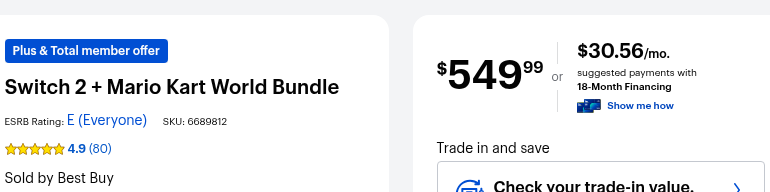
Look for "checked". It means the AI opened the store page and saw the price. "Unverified" means it didn't.
-
Open the link anyway. Prices change by the hour in November.
-
Match the version. Same model, size, color and bundle. The prompt names the version it picked.
-
Check the seller. "Sold by" the store is safest. A ✗ next to it means a third-party seller.
-
Add shipping. A lower price can cost more once shipping is added. Each deal says if shipping is free or what it costs.
Watch out: if the AI gives a price with no link to the item's own page, don't use that price.
Step 4 of 6
Check the deal is real
Trust a markdown only if the store's page shows it or another store you trust charges more.
A "was" price only means something if the store really charged it. The FTC's pricing guide calls a former price "fictitious" when it was "an artificial, inflated price" set up so the store could then offer "a large reduction" (16 CFR 233.1).
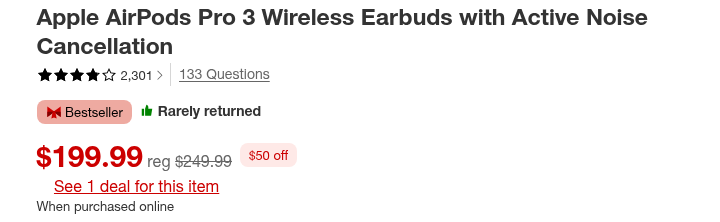
You can't see a store's price history, so use what you can check:
- The prompt only calls something a good price if a page shows a "was" price, a sale label, or a lower price at another store it listed. Anything else gets no comment.
- Compare stores. If two big stores both charge the "sale" price, it may just be the normal price. In our test, AirPods Pro 3 showed "was $249" at Walmart and the same model was $199.99 at Target.
- Recheck in a few days with the recheck prompt. A real deal can end; a fake one often doesn't move.
Watch out: a huge percent off on a site you've never heard of is a reason to slow down, not to hurry.
Step 5 of 6
Type the store's address yourself
Pay on a store you know, with a credit card, and keep your confirmation.
From CISA's "Shopping Safely Online" (opened Nov 4, 2026):
- Buy from stores you know. Attackers build sites that look real, and some get a padlock certificate to look safer. A padlock alone doesn't prove a store is real.
- Type the address yourself. Don't tap the link in a deal email or text. Go to the store's site directly.
- Pay with a credit card. CISA says laws limit what you owe for fraud on a credit card, and you may not get the same protection on a debit card.
- Be careful with gift cards and app balances. CISA says there's no legal limit on what you can lose from money stored in a shopping app or on a gift card.
- Keep your confirmation and check it against your statement. Report anything that doesn't match right away.
Step 6 of 6
Run the before-you-buy checklist
Seven quick checks at the end of this guide.
Mailing gifts yourself?
USPS recommended send-by dates for delivery by Dec. 25 in the lower 48 states (USPS, checked Nov 4, 2026):
- USPS Ground Advantage and First-Class Mail: Thursday, Dec. 17
- Priority Mail: Friday, Dec. 18
- Priority Mail Express: Saturday, Dec. 19
Hanukkah runs Dec. 4 to Dec. 12 this year, so mail those gifts earlier. Other dates are on the same USPS page.
Checklist
- I opened the store's own page and saw this price myself
- It's the exact version I want (model, size, color, bundle)
- Sold by the store, or I'm fine with the third-party seller
- I compared at least one other store I trust
- Any "was" price is on the store's page, not just in the AI's reply
- I typed the store's address myself and I'm paying with a credit card
- It arrives by my date, or I'm buying in person
Prompts in this guide
Questions
Can the AI buy it for me?
No. Every one of these prompts tells the AI not to buy, add to a cart, sign you up or ask for card details. You do the buying, on the store's own site.
Why does it say unverified?
Some stores block AI from reading their pages. Then the AI only saw a search result, which can be out of date. Open the link and read the price yourself.